


FamilyAlbum - Photo Sharing
MIXI, Inc.
Sharing a child’s photos sounds simple until the audience becomes complicated. Grandparents may want regular updates, relatives may live in different time zones, and parents often want a private place that feels less exposed than a public social network. That is the problem FamilyAlbum - Photo Sharing tries to solve. I found it most useful when I treated it as a family memory space rather than another general-purpose photo backup service.
FamilyAlbum is a free parenting app from MIXI, Inc. It is available for Android and iOS, carries a Teen content rating, and includes optional in-app purchases ranging from $0.99 to $109.00 per item. The app was released on April 14, 2015, and its large community—over 10 million installs, a 4.8 average from around 329 thousand ratings, and roughly 6 thousand written reviews—suggests that its focused approach has connected with many families.
What I looked for before trusting it with family memories
My first decision criterion was audience control. A family photo app should make it easy to share a child’s everyday moments with the people who actually care, without turning every update into a public post. I also wanted a service that relatives could understand without needing to become photography or cloud-storage experts.
The second criterion was continuity. Children generate an enormous stream of pictures, but the value is not only in storing them. It is in being able to revisit a sequence: the first day of school, a weekend visit, a funny expression, or a small change that would otherwise disappear among camera-roll screenshots. An app designed around a family timeline has a different purpose from a folder of miscellaneous images.
I also considered how much effort the app adds to a parent’s routine. If every photo requires resizing, labeling, exporting, and separately notifying relatives, the system will probably be abandoned. The best workflow is one that fits around busy moments rather than demanding a new administrative task.
Latest News

Uber Eats Under Pressure: What Happens When Delivery Goes Wrong

How QR & Barcode Scanner Adapts to Android and iOS Innovations

Why Waze Navigation & Live Traffic Is Your Essential Travel Companion

CapCut Mastery: Unleash Hidden Features for Pro-Level Editing

How OS Updates Enhance Roblox Adventures

Teacher Simulator: Exam Time Turns Quick Classroom Judgments into a Repetitive Loop
Finally, I considered the trade-off between convenience and control. A specialized family album can be friendlier than a general cloud drive, but it may not satisfy someone who wants detailed folder structures, advanced editing, or a complete replacement for their existing backup strategy. That distinction matters before moving a large collection of memories into any single service.
A family timeline feels more natural than a shared folder
The strongest part of FamilyAlbum is its sense of purpose. Instead of asking relatives to browse a generic storage space, it gives them a place centered on a child’s life. That changes how photos are used. A quick picture from breakfast can sit beside a more important milestone, and the collection gradually becomes a record of ordinary days rather than only carefully selected events.
I like this approach because parents do not have to decide whether every image is “important enough” to share. A family album can hold the small moments that grandparents enjoy just as much as the polished birthday pictures. That makes it more personal than sending occasional batches through messaging apps.
Gallery
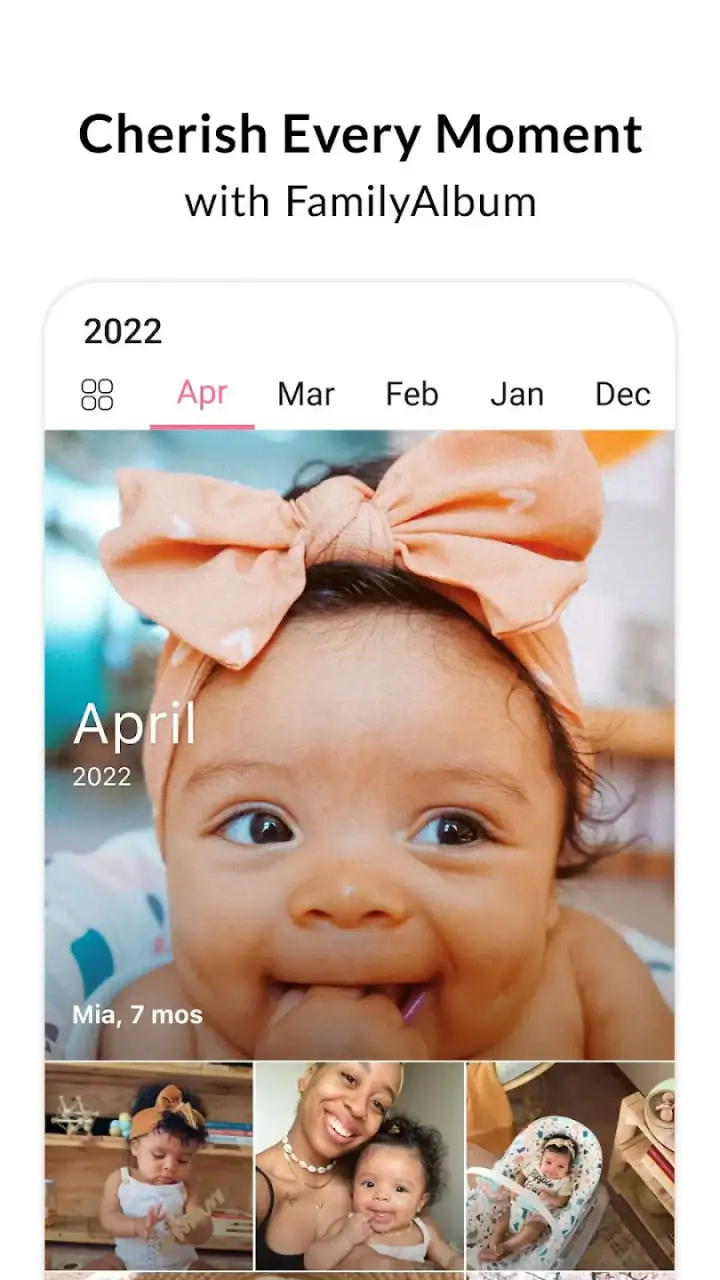
It also reduces the pressure to perform for a wider audience. Public social networks encourage captions, reactions, and presentation. FamilyAlbum is better suited to a quieter rhythm: upload a moment, let relatives see it, and return to the collection later. For families who want a private-feeling space for children’s photos, that focus is a meaningful advantage.
Why the app works well for relatives who are not tech enthusiasts
A common problem with family sharing is that the person taking the photos is not always the person viewing them. Parents may be comfortable with cloud services, while grandparents may prefer something that behaves like a straightforward album. FamilyAlbum’s narrow purpose helps here because relatives do not need to understand a broader storage ecosystem just to follow family updates.
This is especially useful when a family is spread across cities or countries. Instead of repeatedly forwarding the same pictures to several conversations, parents can keep updates in one family-oriented place. Relatives can check in when convenient, and the archive remains more coherent than a long messaging thread.
That convenience is not only about saving time. It also avoids the awkwardness of deciding who should receive each individual photo. A shared family audience creates a consistent destination, which can be less tiring than maintaining several separate chats and remembering which version of an image went where.
A realistic everyday workflow
Imagine a parent collecting a child from school on a rainy afternoon. There is a muddy pair of shoes, a drawing carried home, and a tired smile in the back seat. None of those moments requires a formal announcement, but together they tell a story. With FamilyAlbum, the parent can add the pictures to the family collection while the day is still fresh, rather than waiting until the weekend to prepare a polished update.
Later, a grandparent can look through the sequence and understand the context without asking for each image separately. Months afterward, the same collection can bring back details that would have been forgotten. This is where the app feels more valuable than a basic transfer tool: it supports an ongoing family record, not merely one-time delivery.
My practical tip is to use a light routine instead of uploading everything automatically or trying to curate a perfect archive. Add a few representative moments, keep the sequence understandable, and reserve more deliberate organizing for milestones. That balance keeps the album alive without turning it into another chore.
Where it beats ordinary messaging apps
Messaging apps are excellent for immediate reactions, but they are poor long-term albums. Pictures become scattered across conversations, family members may miss older posts, and finding a particular memory later can take patience. FamilyAlbum’s dedicated setting gives the photos a clearer home.
It is also less dependent on one conversation staying active. A relative who was busy during a hectic week can catch up later without asking someone to resend the images. That makes the app a better choice for recurring family updates than a stream of individual messages.
Compared with a general cloud drive, the advantage is emotional clarity. A drive is usually organized around files, folders, and storage. FamilyAlbum is organized around sharing a child’s life with family. I would choose the specialized app when the audience is mostly relatives and the goal is participation, not document management.
The limitations I noticed in the focused design
The same simplicity that makes the app approachable can feel restrictive to people who want a highly structured archive. If your ideal system includes elaborate folder hierarchies, detailed file naming, professional editing, or a carefully managed backup workflow, a general photo service may fit better.
I also would not treat a family-sharing app as the only place where irreplaceable photos exist. A dedicated backup plan is still sensible for important memories. Sharing and preservation are related, but they are not identical jobs. FamilyAlbum can be the convenient viewing space while another service or device holds an additional copy.
There is also a social consideration. A shared family audience is convenient, but families should agree on what feels appropriate to post and who should have access. Parents may have different comfort levels about children’s images, and relatives may not all use the app in the same way. A short conversation about boundaries is more useful than assuming everyone has identical expectations.
When another category is a better fit
If you mainly need automatic synchronization across your own phones, tablets, and computers, a mainstream photo-storage service may be more suitable. Those tools are generally designed for personal libraries and broader device management. FamilyAlbum makes more sense when the central question is, “How can our family share and revisit a child’s moments?”
If your priority is live conversation around every image, a messaging group may remain faster. It is better for immediate replies, jokes, and urgent updates. The trade-off is that meaningful photos can become difficult to find later. I would use messaging for quick coordination and FamilyAlbum for the lasting family record.
If you are building a professional portfolio, editing a large photography collection, or managing files for several unrelated projects, this parenting-focused app is not the right tool. Its value comes from being specific. It does not need to replace every kind of photo software to be useful.
What the free starting point means in practice
The app is free to download and use as a starting point, which lowers the risk of trying it with a small family group. I would begin by inviting only the relatives who genuinely want regular updates and by testing whether the sharing rhythm feels natural. That gives the family a chance to establish habits before spending money or reorganizing a larger archive.
Optional purchases are available, with individual items priced from $0.99 to $109.00. Because the range is wide, I would review each purchase carefully and decide whether it solves a real problem for your household. The important question is not whether an extra option sounds attractive, but whether it improves the way your family saves, shares, or revisits memories.
There is a hidden cost to switching that has nothing to do with money: habit. Once relatives become accustomed to checking one place, moving to another service can mean re-inviting people, explaining a new interface, and deciding what to carry over. My advice is to choose a clear role for FamilyAlbum from the beginning—family sharing and memories—rather than treating it as an undefined replacement for every photo tool.
Small habits that make the archive more useful
One useful habit is to preserve context in the way you upload. A short sequence from the same event is often more meaningful than a random collection of almost identical images. Think in terms of a beginning, a detail, and a conclusion: arriving at the park, the memorable activity, and the tired ride home.
Another is to include ordinary moments deliberately. Milestones are easy to remember, but a child’s favorite cup, a messy craft project, or a funny pose may become more precious with time. The app’s family-centered format is well suited to these details because it does not require every update to look like an announcement.
I would also make a simple review routine part of the household calendar. Every few weeks, look back through recent uploads and remove accidental duplicates or photos that were shared without enough context. This keeps the album pleasant for relatives and prevents the archive from becoming a noisy camera roll.
For families with multiple children, consistency matters. Decide whether the collection should follow the whole family or whether separate spaces are easier to understand. The right choice depends on how relatives browse and how often updates arrive. A little structure early on can prevent confusion later, especially when several events happen close together.
Who should use it and who should skip it
I recommend FamilyAlbum to parents who want a dedicated place for sharing children’s photos with relatives, especially when those relatives are not comfortable navigating broad cloud-storage systems. It is also a strong fit for families separated by distance, households that dislike public posting, and anyone who wants everyday snapshots to become a continuous memory collection.
I would be more cautious if you already have a carefully organized photo library and are satisfied with your current sharing method. Switching only makes sense if the family-focused experience solves a real frustration. Likewise, photographers who need advanced cataloging, editing, or file control should look toward tools built for those tasks.
The Teen content rating is worth noticing for households that manage devices for younger users. It does not change the app’s parenting purpose, but it is a reminder to handle account access and family participation thoughtfully rather than assuming that every child should use the service independently.
My recommendation after weighing the trade-offs
FamilyAlbum succeeds because it concentrates on one relationship: parents sharing a child’s life with family. In my experience, that focus makes it warmer and easier to maintain than a generic folder, while giving it more lasting value than a temporary message thread. Its best feature is not a flashy technical trick; it is the way the app encourages a steady, shared family record.
Choose it if your priority is simple, ongoing family photo sharing. Start with a small group, establish sensible posting habits, and keep a separate backup for memories you cannot replace. If you need advanced photo management, broad device synchronization, or professional organization, use a more general service instead.
For the right household, the free entry point makes the decision easy: try it with a few real updates and see whether relatives actually return to the album. If they do, the app has earned a place in the family routine. If they only need occasional messages or already have a reliable photo system, staying with the current alternative may be the more practical choice.
Overall, I see FamilyAlbum - Photo Sharing as a thoughtful parenting app rather than a universal photo solution. MIXI, Inc. has built its appeal around shared memories, and that narrow purpose is exactly why I would recommend it to families who want their children’s everyday moments to remain connected, discoverable, and easy for loved ones to enjoy.
FAQs for FamilyAlbum - Photo Sharing
What features does FamilyAlbum offer for photo sharing?
FamilyAlbum provides a seamless photo-sharing experience designed specifically for families. It allows users to upload unlimited photos and videos, create personalized albums, and share them privately with selected family members. The app also offers automatic organization, monthly photobooks, and a timeline view to easily track and revisit memories.
Is FamilyAlbum secure for sharing private family photos?
Yes, FamilyAlbum prioritizes user privacy and security. The app ensures that all shared content is kept private, accessible only to invited family members. It uses advanced encryption to protect data and offers various privacy settings to control who can view photos and videos, making it a safe choice for families.
How does FamilyAlbum help in organizing family memories?
FamilyAlbum automatically organizes photos and videos by date, creating a chronological timeline of family memories. It also offers features like album creation, tagging, and captions to help categorize and describe moments. Additionally, the app generates monthly photobooks, making it easy to revisit and share cherished memories.
Can FamilyAlbum be used on multiple devices?
Yes, FamilyAlbum is designed for cross-device compatibility. Users can access their family memories from any smartphone, tablet, or computer. The app syncs seamlessly across devices, ensuring that all family members have access to the latest photos and videos, no matter where they are.
Does FamilyAlbum offer any additional features for premium users?
FamilyAlbum offers a premium subscription that unlocks additional features. Premium users enjoy benefits such as longer video uploads, additional storage, and the ability to download photos and videos in high resolution. Subscribers also receive discounts on printed photobooks and other personalized keepsakes, enhancing the overall family memory experience.
Pros
- Intuitive interface for easy navigation.
- Unlimited storage for photos and videos.
- High-quality uploads without compression.
- Family-friendly privacy settings.
- Easy to create and share albums.
Cons
- Limited editing tools for photos.
- Requires internet for optimal use.
- Notifications can be overwhelming.
- No direct social media sharing.
- Limited customization options.


